Ubiquiti CloudKey+ UCK-G2-PLUS gitlab config backups
Ubiquiti Sucks
It appears Ubiquiti decided to remove the git package. So- if you install your own git package, you can do the below. If not, it won't work anymore.
Overview
The Ubiquiti CloudKey+ allows backing up via the console. ...but what happens when the SD card goes kaput, and you lose your backups, right when you need them most?
Simple Answer
The simple answer that I came up with is to not only back up the configs using the standard backup (available on the webui), but also to keep a copy (with revision history) in gitlab automatically, every day.
How
This is a very barebones way to do it, so- if you break your stuff, welp- I got nothin'. I'm doing all this as root, since- the system security is such that if you are logged into the box, you have everything anyway, so--- whatever.
Create the script
I have a /root/bin directory where I keep the script to do the backup to gitlab. Here is the script, which is placed at /root/bin/git-backup:
#!/bin/bash

verid=`find /sdcard/autobackup/ -regextype posix-extended -regex '^.*autobackup_.*\.unf' -mtime 2 | tail -1 | awk -F'_' '{print $2}'`

if [ "Z$verid" = "Z" ]; then exit 67
fi

/usr/bin/which git > /dev/null
if [ $? -ne 0 ]; then apt install -y git
fi

mkdir -p /root/unifi-configurations/"$verid"

find /sdcard/autobackup/ -regextype posix-extended -regex '^.*autobackup_'"$verid"'.*' -mtime -1 -exec cp {} /root/unifi-configurations/"$verid"/autobackup.unf \;
find /sdcard/autobackup/ -regextype posix-extended -regex '^.*recovery-'"$verid"'.*' -mtime -1 -exec cp {} /root/unifi-configurations/"$verid"/recovery.unf \;

cd /root/unifi-configurations
git add -A
if [ $? -ne 0 ]; then exit 127
fi

git commit -m "Latest backup push on `date`"
if [ $? -ne 0 ]; then exit 126
fi

git push origin main
if [ $? -ne 0 ]; then exit 125
fi

exit 0
The script does the following:
- Looks at the SD card backup location and looks for the latest autobackup*.unf file, and parses the version number from the filename. If it didn't work, it exits.
- Makes sure git is actually installed. When updates are installed, the packages are reset, so git is removed. This ensures it's readded.
- Make the directory for configs.
- find(1) the latest autobackup and recovery files for the current version, copy to the new config directory.
- Add the new files to git repo (only needed when new files are present for a new version, will do nothing if already there).
- Commit the files with a comment of the date(1) output.
- Push the files to gitlab.
Set up cron
Next, set up /etc/cron.daily/git-backup to execute the script. One could make this all one script, but whatever- it's how I'm doing it.
#!/bin/sh

/root/bin/git-backup > /var/log/git-backup.lastrun
EXITVALUE=$?
if [ $EXITVALUE != 0 ]; then
    /usr/bin/logger -t git-backup "ALERT exited abnormally with [$EXITVALUE]"
fi
exit $EXITVALUE
The cron job will create a log at /var/log/git-backup.lastrun with the last output of the command.
Change permissions
Make the /root/bin/git-backup executable by root:
chmod 700 /root/bin/git-backup
Then change the permissions on /etc/cron.daily/git-backup:
chmod 755 /etc/cron.daily/git-backup
Now- I create the repo in gitlab, get a token for access, and do:
git add -A
and
git commit -m "Latest backup push on `date`"
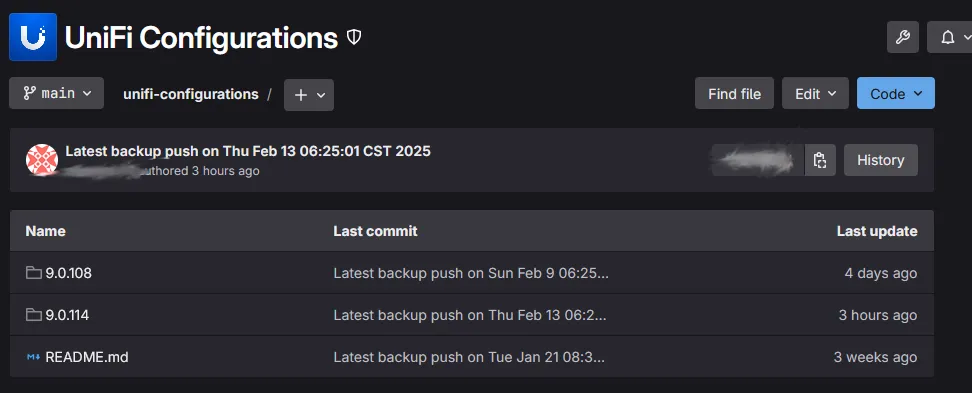
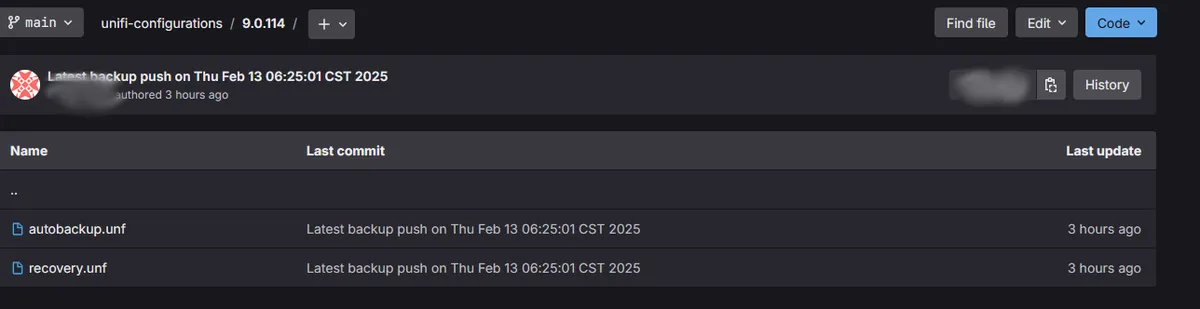
...and now- we have by-version backups on gitlab:
I'm sure I missed a couple of steps, but this should get you pointed in the right direction.